
How to get Likes on Facebook can be a real challenge. However there are some brands, companies and people who excel at driving fan engagement on Facebook. In this post I take a look at 10 examples of viral Facebook posts and consider why they worked so well.
# 1. Bud Light knows their customer
Getting lots of likes isn’t enough as you’ve also got to appeal to those people on Facebook that are most likely to become customers. This post from Bud Light targets people who are interested in the “gameday”, includes a great image and a link to their website.
# 2. Mari Smith values and involves her fans
If you don’t really value and involve your fans, they’re not going to engage with your posts. Here’s a super example of how-to from Mari Smith called “Facebook Friday”. She helps her fans grow their own social presence by allowing them to post their links on her very popular Facebook page.
# 3. Jameson Whiskey asks questions
Asking questions can be an easy way to engage your fans and receive likes, comments and shares. With a little consideration, Jameson whiskey show you how it’s possible to ask a question that both relates to your brand and engages fans, and at the same time.
# 4. A Mascot works for KFC
Mascots work well on Facebook. Colonel Sanders is the founder of KFC and was born in 1890, he is also their official mascot and recognised the world over. Above is a creative example of how KFC use his notoriety to engage their fans.
# 5. Intel shares eye catching images
Research shows that images continue to drive the most engagement on Facebook. Images are now so widely used by brands that it’s becoming increasingly difficult to get noticed on your fan’s newsfeeds. When Intel shares images, they’re creative and unusual but perhaps more importantly - they’ re really eye catching!
# 6. JetBlue Airways uses humour
Sales speak doesn’t work well on Facebook as the platform is primarily a place where people come to socialise. Humour on the other hand can work extremely well. JetBlue Airways combine a funny image with a brand related question to drive lots of engagement with their fans.
# 7. CruiseDeals asks for likes
Including a simple call to action in your posts can really optimise on the levels of fan engagement. CruiseDeals demonstrates how-to with a great big “Hit Like” on this post and image from their Facebook page. It’s simple but very effective.
# 8. Nutella takes advantage of special days
There are many special days over the course of the year including: Xmas, New Years, Halloween etc etc. Nutella use an image, poem and a call to action to takes advantage of Valentine’s day and drive engagement and brand awareness amongst their Facebook fans.
# 9. Culver’s just use today
You don’t even need to wait as nowadays, nearly every other day is a celebration or an official day of something or someone. Here’s how Culver’s combines an image and a call to action to invite their fans to recognise National French Fry Day on July 13.
# 10. Walmart demonstates the power of polls
Polls can be another super way to drive engagement as they can tap into the competitive nature of fans. In the run up to Halloween: Walmart drove huge numbers of likes and shares, when they asked fans to vote for their favourite by either “Liking” Kit Kat or “Sharing” Reese’s.
Conclusion
Having looked at these viral post examples on Facebook, I found the following tips:-
- First, you want to engage rather than broadcast on Facebook.
- Know your customer and ensure that your messaging is targeted.
- Questions are an easy way to engage but they will need to be considered and relevent.
- Images work best but you will need to be creative to catch the attention of fans.
- Use humour where you can.
- Include a call to action in your posts.
- Help your fans to celebrate special days or even today.
- Use polls to tap the competitive nature of your fans.
- And the most viral posts combine many or all of these elements in one post.
Understanding the Digital Economy
Reports:
- Travel and Tourism
 E-Commerce
- Food and Drink Sector
- International Student Recruitment
- General and Health Insurance
- FMCG Sector – Retail and Ecommerce
- Attracting Top Tier Talent
- Social Media in Politics
Guides:
Contact us
If you would like to talk to The Ahain Group about Facebook please feel free to contact us.
Connect: 


In the midst of a technological revolution and during an economic climate that demands innovation, a survey by the Irish International Business Network (IIBN) discovered that only one in six businesses in Ireland views e-commerce as vital to their growth.

My initial reaction upon reading this was one of disbelief. How could so many Irish businesses be so out of touch with reality?
- According to the survey, the average Irish adult now spends €1,392 per year online. It’s important to note that the majority of this spend is leaving Ireland with NO benefit to the Irish exchequer.
- Our own Ahain Group report described how e-commerce in Ireland and Internationally continues to grow massively, year on year.
- We’re all familiar with how industries like travel, hospitality and music have moved online but did you know that 74% of UK consumers now also use the Internet for their grocery shopping.
Let’s not confuse opportunity with choice
There are massive opportunities online. However, we need to be careful not to confuse opportunity with choice.
- Companies like HMV are a harsh lesson in what happens if you choose to ignore the internet, your customers and their changing shopping habits.
- The internet has become the significant influence in many of our purchasing decisions and will shortly become the major influence in virtually all of our purchasing decisions.
- Those five of out six Irish businesses that don’t appreciate this need to come to terms with it very quickly.
Real leadership please!
We desperately need real political and business leadership around the internet. Rather than people pretending to know what they’re talking about, we need people who actually know what they’re talking about.
And if the survey by the IIBN is anything to go by, we need it now. What do you think?
Understanding the Digital Economy
Reports:
- E-Commerce
- Food and Drink Sector
- International Student Recruitment
- General and Health Insurance
- FMCG Sector – Retail and Ecommerce
- Attracting Top Tier Talent
- Social Media in Politics
Guides:
Contact us
If you would like to talk to The Ahain Group about e-commerce please feel free to contact us.
Connect:
Are you struggling to grow your brand, followers, re-pins and use Pinterest for business? Pinterest, Facebook, Twitter, LinkedIn and Google+ can be daunting at the start, however many companies and brands have successfully achieved a social media ROI. Previously, we looked at 5 inspirational companies on Facebook, on Twitter and on Linkedin - this time we focus on Pinterest for Business.
- Strategy: You will need to have a Social Media Strategy. Each business will have a different set of goals and business KPIs so tactics will differ accordingly.
- Branding: An effective Pinterest strategy allows a business to quickly and cheaply grow it’s brand and reputation.
- Traffic: Pinterest has the ability to become a robust driver of traffic to your website.
- Sales: It has been found to be one of the most effective social media at driving customers and sales.
Using a Pinterest for Business Account?
- Increase Followers – Attract people who want to know more about your business, it’s products and who will become your customers.
- Promote Products – Promote your products or services on Pinterest
- Offer deals - Offer your community exclusive deals in exchange for them becoming valuable brand advocates
- Competitions - Use Pinterest to devise and run unique competitions and further grow your brand, traffic and followers.
Here are five brilliant businesses and brands to follow if you’re looking for inspiration:
# 1. Sony on Pinterest
Sony has over 32,000 followers on Pinterest with their 30 boards including a mix of product, lifestyle and fun.
The “Sony’s on Sale” board features exclusive deals as a reward for re-pinning.
- They add a pin featuring the product they are offering the exclusive deal on, and the number of re-pins that are needed to unlock that deal.
- Once the re-pin goal is reached, the link on the pin changes to click through to a new page where followers can find the special code to redeem that deal.
Sony’s “Pin It To Give It” board raised more the $12,500 in one month - from November 27th to December 31st, 2012, Sony gave a dollar to the Michael Phelps Foundation for every re-pin.
# 2. Jetsetter on Pinterest
Jetsetter is a travel community and members’ only website that provides those members with access to expert knowledge and exclusive deals. They have created 48 boards and now have over 4,500,000 followers on Pinterest.
To encourage people to explore their website, Jetsetter ran a unique online scavenger hunt called “Pin Your Way to Paradise.”:
- Over a two week period, members were prompted with daily clues and the challenge to pin photos that best matched those clues. Pinners had to navigate the website to find the relevant daily images
- It resulted in over 16,000 pins and over 800 boards.
The “Jetsetter Curator – Adventure” contest and board asked pinners to create “the ultimate destination pinboard”:
- Photos were pinned across four categories: escape, adventure, style and cosmopolitan.
- Boards had to have “Jetsetter Curator” in the name and each pin had to include the hashtag: #JetsetterCurator.
- The contest generated nearly 50,000 pins with more than 1,100 people taking part.
- The winner in each category won a three night stay at a Jetsetter destination relating to that category, and the most followed board won $1,000 in Jetsetter credit.
# 3. Constant Contact on Pinterest
Marketing software provider, Constant Contact has 85 boards and over 12,000 followers on Pinterest.
- Their “Ask an Expert” board with nearly 3,500 followers is a place where they pin videos of Constant Contact “experts” providing the community with advice and tips.
- And the “Successful Customer Spotlight” board showcases many examples of customers who have achieved success as a result of using the software.
# 4. Boticca on Pinterest
Online boutique Boticca have over 4,500 followers on Pinterest. They became one of the very first retailers to add the “Pin It” button to their website alongside Twitter, Facebook and Google+.
- They have 104 boards including several group or community boards.
- Their “Simply Chic” board for example invites users to share their “Chic Inspiration” and is open to all.
- Also, using data from their website, Boticca discovered that although engagement was higher from Facebook- Pinterest users outspent those from Facebook by $95 per person.
# 5. Calypso St. Barth on Pinterest
Calypso St. Barth are a luxury lifestyle brand who have over 13,500 followers on Pinterest with their 29 boards including both product and fun themes.
- I particularly like their “Words To Live By” board which includes images, video, quotations and content about what’s important in life and staying positive.
- And their “Bon Appetit” board is one that’s sure to tempt the taste buds.
Conclusion
So having studied some of the top brands on Pinterest, here are a few similarities in their strategies that stand out:-
- Create boards that include a mix of product, lifestyle and fun.
- Add the “Pin It” button to your website.
- Offer exclusive deals to your Pinterest followers in exchange for their re-pins.
- Use Pinterest in conjunction with your website to drive engagement from your community and traffic back to your website.
- Create group or community boards and invite your followers to partake.
- Run competitions using Pinterest but be creative and allow your followers to be creative too.
- Pinterest is must have for B2C but it can also be effective for B2B companies.
Understanding the Digital Economy
Reports:
- E-Commerce
- Food and Drink Sector
- International Student Recruitment
- General and Health Insurance
- FMCG Sector – Retail and Ecommerce
- Attracting Top Tier Talent
- Social Media in Politics
Guides:
Contact us
If you would like to talk to The Ahain Group about Pinterest please feel free to contact us.
Connect:
HootSuite is a social media management platform and dashboard that can be used to manage multiple social media channels, schedule posts, track mentions and traffic. It allows businesses and teams to collaboratively execute campaigns across social networks such as Twitter, Facebook, LinkedIn and Google+.
The business case for using Hootsuite
- The social media management platform now has over 6 million users.
- This growth is largely driven by increased demand among large global organizations.
- It is available in 13 languages and is used by more than 79 of the Fortune 100 companies.
Setting up
- Go to hootsuite.com
- Type your email address, name and password
- Click Sign Up Now
Note: You can also sign up using Facebook
Plans and pricing
There are three different pricing and feature levels:
- Free - This is their entry level/single user account with up to 5 social profiles.
- Pro - Includes 2 users and up to 50 social profiles, enhanced analytics report and unlimited apps from $8.99/month
- Enterprise - 5 to 500,000+ users with unlimited profiles, advanced security, geo-targeting, advanced customer support and Hootsuite University. Pricing is not available.
Adding social networks
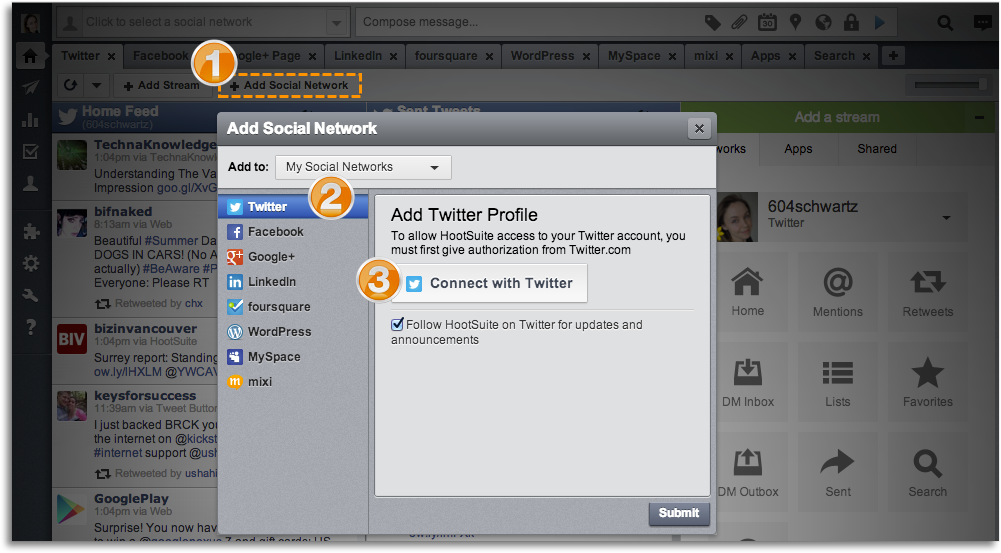
[Image: Hootsuite.com]
- Click Add Social Network button
- Select a social network
- Connect your social network
Streams
Once a social network has been added to your account, you can then select which streams you’d like add to your dashboard.
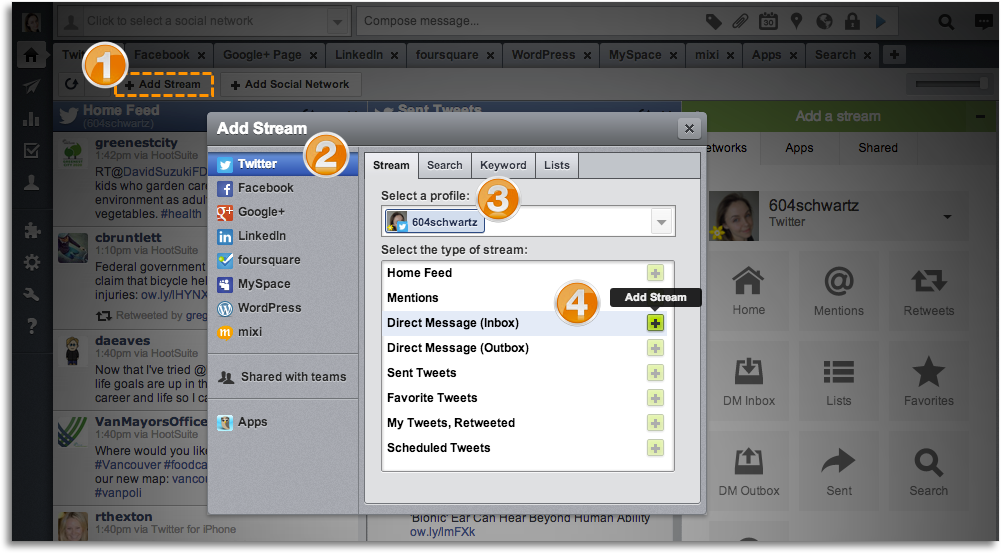
[Image: Hootsuite.com]
- Click Add Stream
- Select a social network
- Select a profile
- Select a stream
Filters
You can filter streams by:
- Keyword
- Klout score
Hashtags
Or if you are attending a conference and want to keep track of the hashtag for the event, enter it in the search box and save as stream.
Tabs
Adding tabs to the dashboard is an easy way to group streams and keep your dashboard organized.
- From the launch menu on the left, click the house (Streams) icon.
- Click the plus (Add Tab) icon located on the right side of your tab row.
- Type your tab name, and then press ENTER.
Sending messages
- Click to select a social network (more than one can be selected)
- Type your message
- Click Send
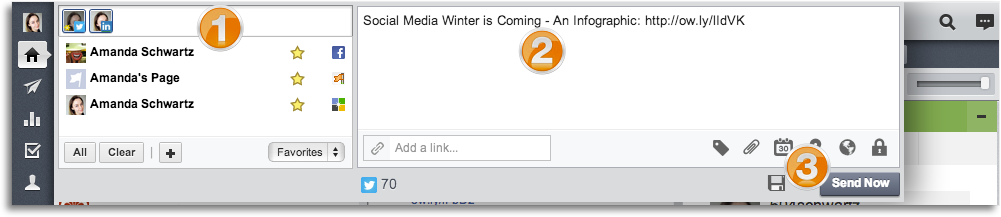
[Image: Hootsuite.com]
Shrinking URLs
Shrinking a URL will save character space (especially for Twitter) and generate analytics based on the clicks your shortened URL receives:
- Click Compose message
- Click add a link
- Paste or type URL
- Click Shrink
To change the default shortener:
- Click the gear (Advanced) icon
- Click to select your default URL shortener, and then click the X button to close menu
- This setting will be saved even after you log out of your HootSuite dashboard
Scheduling
HootSuite also allows you to schedule messages to be sent later.
- Click the calendar icon
- Select the date for the message to be sent
- Select the time
- Click schedule
RSS feeds
Hootsuite allows you take an RSS feed from any site and update it to your social network accounts automatically.
- From the launch menu on the left, click the paper airplane (Publisher) icon
- Click RSS Feeds
- Under RSS/Atom Feeds, click plus (Add New Feed) icon
- Type the URL
- Click to select the profile that will post the RSS feed
- Click to select how often HootSuite will check for new posts
- Click to select how many posts will occur at one time
- Click to add check mark, to include text from post in messages
- Type text to add to each message; 20 characters maximum
- Click to select a URL shortener
- Click Save Feed
Installing Apps
The App Directory is a library of free and premium third-party apps you can add to your dashboard including Flickr, YouTube, Tumblr, MailChimp, HubSpot.
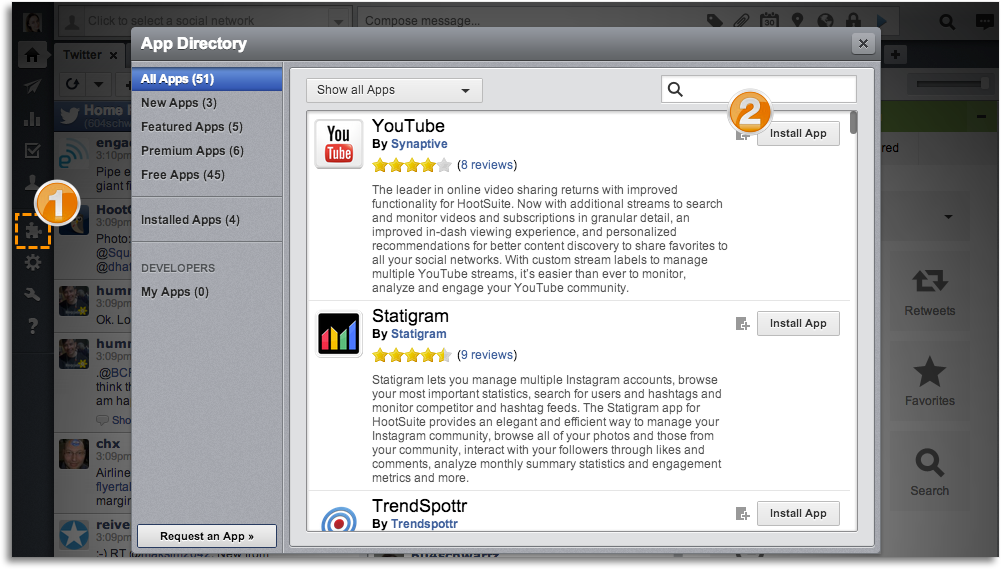
[Image: Hootsuite.com]
- Click puzzle piece (App Directory) icon
- Click Install App beside the app to add
Mobile
HootSuite is available as an app for your mobile device (iPhone and iPod Touch, iPad and Android), and can be downloaded from your device’s app store.
Organizations and teams
Hootsuite for organizations (and teams) are included in the HootSuite Pro and Enterprise plans and provide a solution for social media team management.
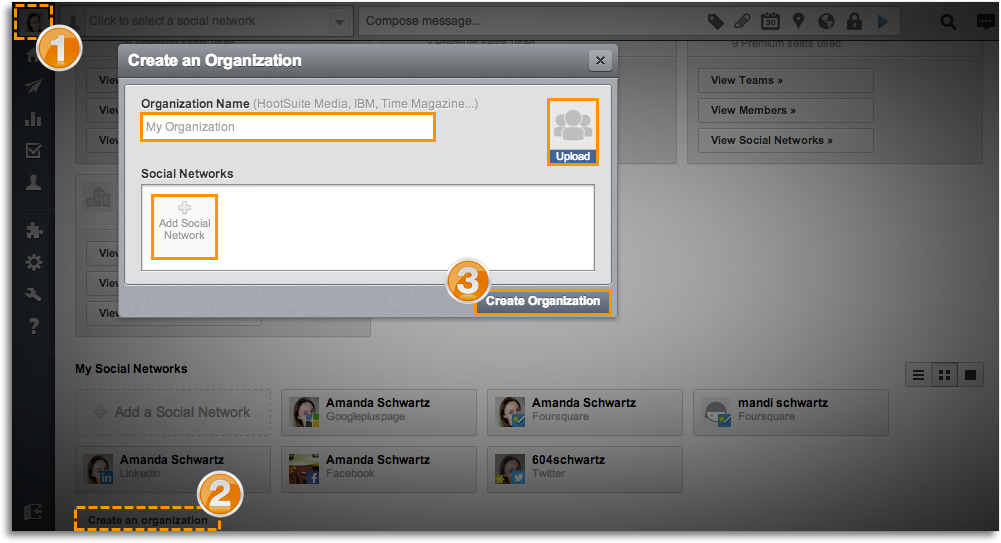
[Image: Hootsuite.com]
- Click user profile icon
- Click Create an organization
- Name organization, upload image for organization, (optional) add a social network, and then click Create Organization
Members
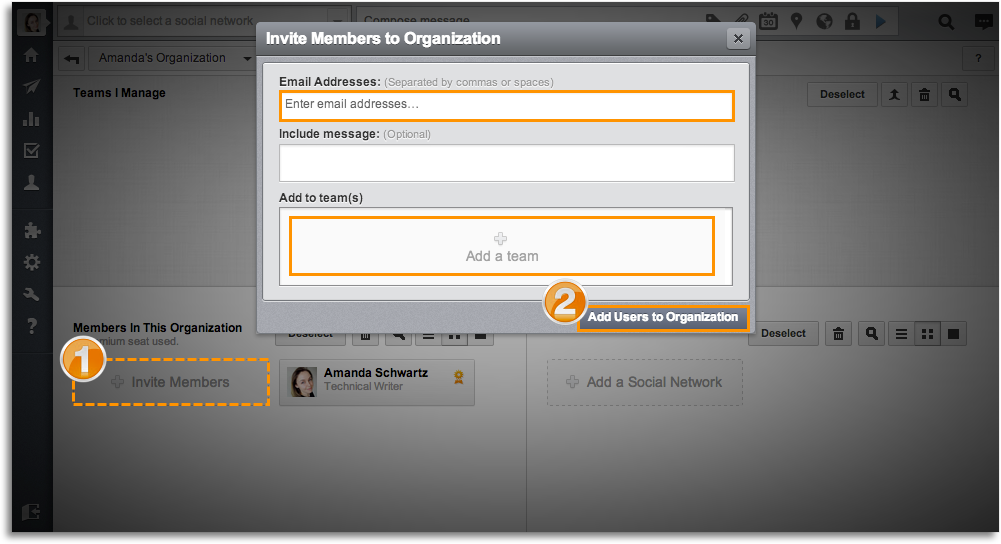
[Image: Hootsuite.com]
- Click Invite Members
- Enter email addresses, (optional) add team, and then click Add Users to Organization
Teams
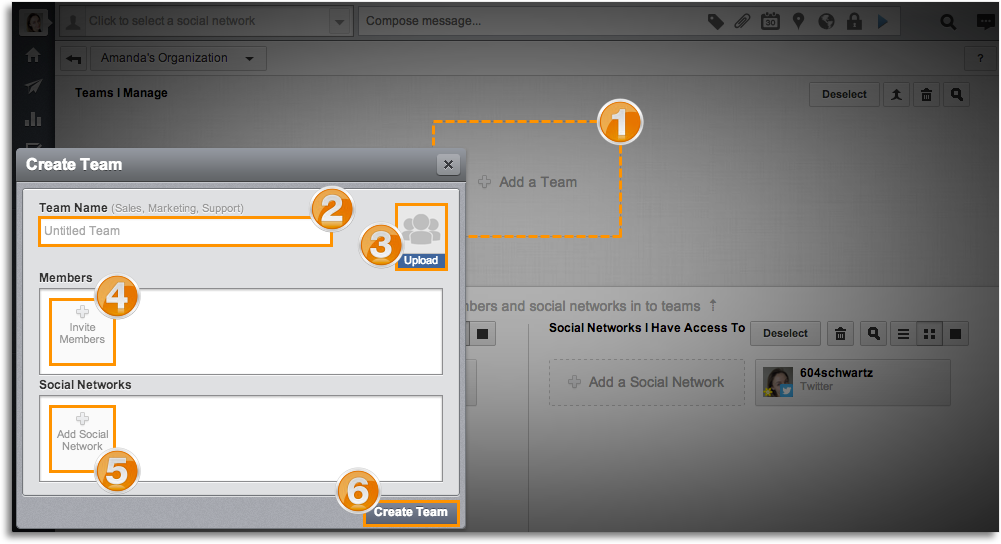
[Image: Hootsuite.com]
- Click Add a Team
- Name team
- Upload image for team
- Click to select members that will complete actions for team (added in step 2)
- Click to select social networks that will be used by team (added in step 3)
- Click Create Team
Permission levels
- Hover mouse over organization [team or a social network], click gear icon, and then select Manage Permissions
- Click to select permission level
Conversations
Users can now communicate internally and in real-time from the Hootsuite dashboard. Conversations are located in the upper right-hand corner.
- Click on the chat-box icon.
- Click the prompt to “Get started now”
- Import contacts from your Gmail and Yahoo address books, or add individual users to your Conversation’s Organization.
- Select the users you would like included in your Organization’s Conversation. Invited members are included in your Conversation upon their email-acceptance.
Analytics
Hootsuite’s built-in analytics and reports gives you access a lot of information, and all in one place:
- Google Analytics - Using Google Analytics and URL parameters, trace revenue and web conversions to your social outreach.
- Facebook Insights - Monitor and measure your fans, likes, comments and page activity.
- Twitter Stats - Followers, following, lists, mentions, and more.
- Ow.ly Stats - Individual and aggregated click stats for your shortened URLs.
- Google+ Page Analytics (Enterprise) - Growth, number of users added to circles, +1 shares, and posts per day.
- Organization Analytics (Enterprise) - Reports based on your Organization’s metrics
- Reports - Create quick or custom reports to keep your team up-to-date with results.
Hootsuite ROI
- Education - Destination Imagination, an innovative education program used Hootsuite to share the accomplishments of their students with a world audience including parents, educators, potential sponsors, 38,000 volunteers and 1.5 million alumni.
- Communication - Morris County used HootSuite during Hurricane Sandy to disseminate government information and respond to citizen questions.
- Reach - New York increased the City’s digital reach, built and maintained a social media audience of 2.8 million and made New York City a global leader as a digital city.
- Engagement -Major League Soccer successfully improved social media engagement while awarding a player with MLS Allstar status.
Understanding the Digital Economy
Reports:
- E-Commerce
- Food and Drink Sector
- International Student Recruitment
- General and Health Insurance
- FMCG Sector – Retail and Ecommerce
- Attracting Top Tier Talent
- Social Media in Politics
Guides:
Contact us
If you would like to talk to The Ahain Group about Hootsuite please feel free to contact us.
Connect:
BizSugar is a niche resource and social networking platform for the small business community. The social networking platform is owned and operated by Anita Campbell of Small Business Trends LLC. Small Business Trends LLC is a stable of 7 websites including the flagship site Small Business Trends, group business blog Tweak Your Biz and BizSugar. As their former community manager, I am well placed to advise you on how to get the most from the platform.
What is BizSugar?
BizSugar is a place where you can submit and share your small business content. Once submitted, the BizSugar community votes on this content with the most voted posts making it to the home page.
The business case for using BizSugar
- BizSugar is a niche and successful social media for anyone interested in the International Small Business community.
- With over 1 million registered members based around the Globe, it is an effective way to target the small business community, promote your content and drive qualified traffic back to your website.
- It allows you make connections with small business owners, managers and entrepreneurs and to stay informed.
- “Top stories” on BizSugar make it into their Top 10 widget, weekly Top 10 newsletter and the Twitter feed where they get even more visibility.
Setting Up
New users need to provide a username, email, and password, and confirm if they would like to subscribe to the weekly Top 10 newsletter.
Then, once your account has been set up, you can further edit your profile to add more info including your:
- Avatar
- Location
- Occupation
- Skype
- YouTube
- Websites
- Interests
- RSS
Note: You can also log in using your Facebook account.
Submitting content
To maintain the quality of the website and information, content that gets submitted to BizSugar goes through a moderation process:
To submit your content to BizSugar, you need to include:
- URL
- Category
- And description
Moderation team
This content then goes into a queue to await approval from the BizSugar moderation team.
Guidelines
Here are the full BizSugar submission guidelines but in short, content needs to be specifically relevant to small business. Also, titles must not include site names, locations and other words unrelated to the article and there should be no barriers i.e. extra windows, forms, or links out that readers have to click through.
Voting
Voting on BizSugar is easy.
Users simply:
- Log in
- and vote (“sweet”) for their favourite articles.
Voting buttons
BizSugar also provides the option of voting buttons.
These you can install onto your website or blog and allow the community to vote for your content directly from there.
Getting more “Sugars”
As with any other social media and online community, the more you put into BizSugar, the more you will get out in the long run:
- Content: The first step towards getting these votes is of course, creating and submitting great content to BizSugar. However, it’s also a good idea to submit more than just your own content. If you find information that the small business community would find useful, why not submit that too!
- Community: Playing an active part in the BizSugar community, voting and commenting on other members’ content will get you noticed and will in turn help your content to get votes, comments, exposure and traffic.
BizSugar exposure
Getting your content onto the homepage is where you want to be seen on BizSugar: the more votes you secure, the better your chances of getting on there:
- Hot stories: Hot stories are published to the @BizSugar Twitter feed which has over 20K followers.
- Weekly Top 10: The content with the most votes over a 7 day period also have the added bonus of being included on the BizSugar newsletter that goes out on Fridays to over 200,000+ subscribers.
- Video & Image Gallery: BizSugar launched a new “Video & Image Gallery” on October 30, 2012. Videos include those submitted by members as well as some especially selected by the moderation team.
What others say about BizSugar:
Steven Hughes, GeeklessTech:
“BizSugar is a recommended platform to market your website and blog…There are also moderators that get involved and comment, keeping the pace fluid…Be consistent and you’ll make connections. The BizSugar blog traffic back to your site will be sweet.”
TJ McCue, Forbes:
“If you are looking for high quality content you can trust, BizSugar offers it. There are real people moderating, vetting, and culling out the spam. There is an opportunity to build a reputation in this niche social network and then spread your content and ideas.”
John Jantsch, Wall Street Journal:
Try “networks that cater to business owners, such as Biznik and BizSugar.”
Understanding the Digital Economy
Reports:
- E-Commerce
- Food and Drink Sector
- International Student Recruitment
- General and Health Insurance
- FMCG Sector – Retail and Ecommerce
- Attracting Top Tier Talent
- Social Media in Politics
Guides:
Contact us
If you would like to talk to The Ahain Group about BizSugar please feel free to contact us.
Connect: